Screenplay Reader Analytics: Interpreting Engagement and Page Dwell Time
In traditional film industry submissions, writers and producers send a script attachment and enter a prolonged state of uncertainty. Weeks pass with no feedback. Senders wonder:
- Did the producer actually read the script, or did it sit in a crowded inbox?
- Did an assistant read the first ten pages and pass?
- Did the executive read all 110 pages in a single sitting before the weekend meeting?
Modern document sharing platforms replace blind guesswork with session telemetry and page-level engagement analytics. By capturing dwell time, completion percentages, and reading cadence, production teams gain actionable operational intelligence.
Moving Beyond the “Open” Vanity Metric
In standard email tracking or file-hosting tools, an “open” or “download” is the only metric provided. For screenplays, this is notoriously misleading:
- Scenario A (False Positive): A reviewer opens the link, glances at the title page for 8 seconds, gets interrupted, and never returns. Traditional tracking records this as a successful “read.”
- Scenario B (True Engagement): A producer opens the link, spends 45 seconds on Page 1, reads methodically through Page 30, and returns three hours later to complete the remaining act.
Both show up as “1 View” in legacy systems, but their commercial significance is radically different.
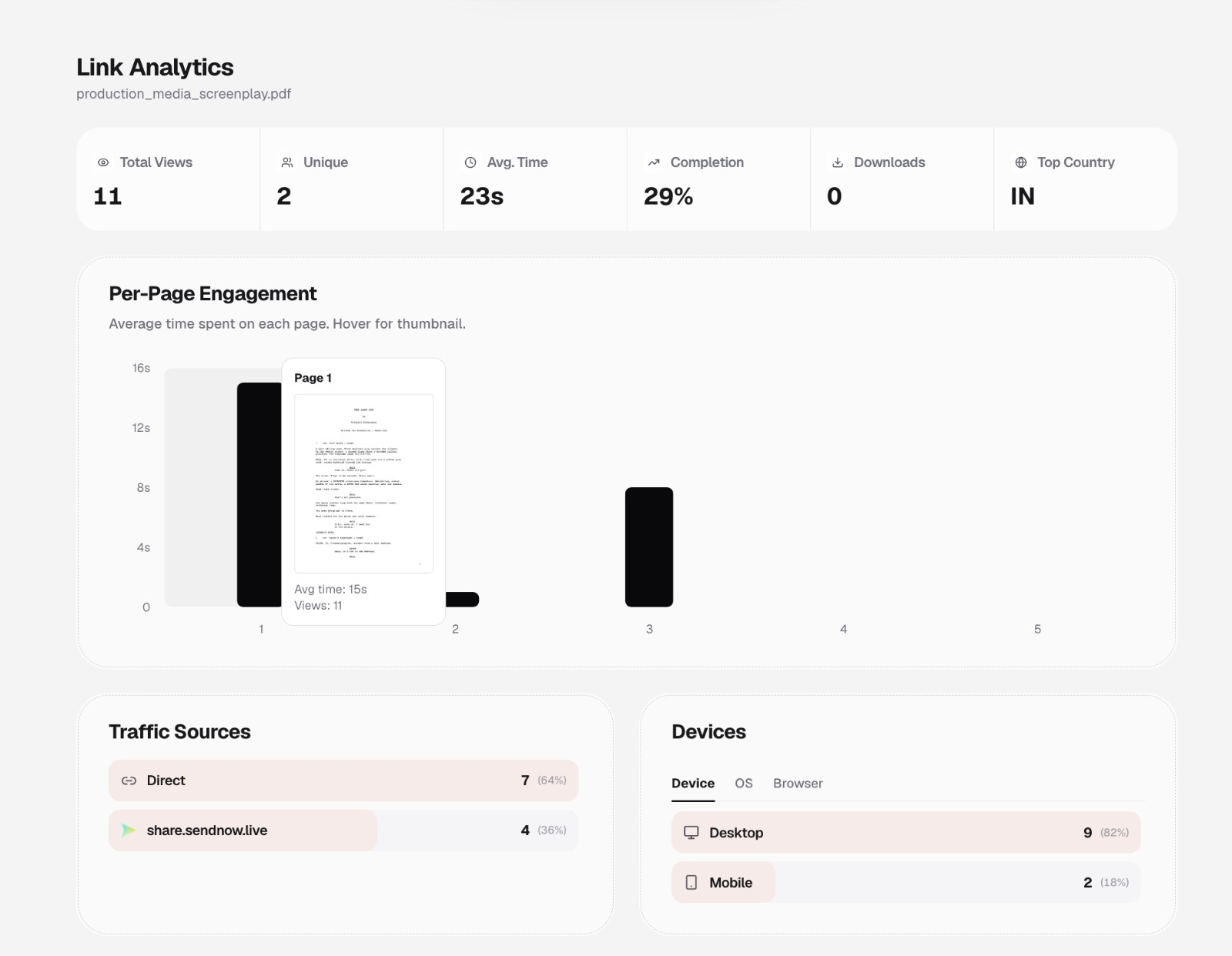 Figure 1: Document analytics dashboard displaying high-level performance indicators alongside per-page dwell time distributions.
Core Metrics to Track for Screenplay Distribution
When evaluating link performance, monitor these six key indicators:
- Unique Viewers vs. Total Views: Indicates whether multiple individuals are accessing the link or if a single collaborator is revisiting the draft repeatedly.
- Average Viewing Duration: Total active time spent on the document. A typical feature screenplay (90–120 pages) takes approximately 75 to 110 minutes to read thoroughly. An average time of under 3 minutes indicates early abandonment.
- Completion Percentage: The proportion of the total script viewed by the recipient. Reaching 80%+ indicates the reader progressed into Act III.
- Downloads Count: Confirms whether any authorized offline copy was retrieved (or verifies that downloads remained strictly at 0 if disabled).
- Geographic & Device Breakdown: Pinpoints device type (desktop vs. mobile) and locale, confirming whether an executive reviewed on an office workstation or on an iPad during transit.
- Per-Page Engagement Curve: Visualizes exact seconds spent on each page of the screenplay.
Page-by-Page Dwell Time Analysis: The “First 10 Pages” Rule
Industry script readers and development executives famously evaluate scripts by their opening pages. Page-by-page analytics illuminate exactly where readers engage or drop off:
Dwell Time per Page (Seconds)
Page 1:  [=========================] 55s  (Title page / opening scene slug)
Page 2:  [==============================] 68s  (Character introduction)
Page 3:  [===========================] 60s  (Inciting incident setup)
Page 4:  [=======================] 50s
Page 5:  [=====] 12s  (Sudden drop-off indicates skimming or abandonment)
Page 6:  [=] 2s
Page 7:  [0] 0s       (Unread)
Common Engagement Patterns
- The Hooked Reader: Consistent dwell times of 45–70 seconds per page extending through the entire script, often characterized by deliberate pauses on dense action blocks.
- The Early Drop-Off: Strong engagement on Pages 1–3 followed by a steep drop to zero by Page 5 or 10. Indicates the opening did not hook the reader or the premise failed to align with their mandate.
- The Skimmer: Uniform dwell times of 3–5 seconds per page across 50 pages. The recipient quickly flicked through formatting, scene count, and dialogue density without reading the story beats.
Auditing Individual Reviewer Activity
Aggregate metrics tell you how a script performs overall; individual visitor logs show what a specific prospective partner did.
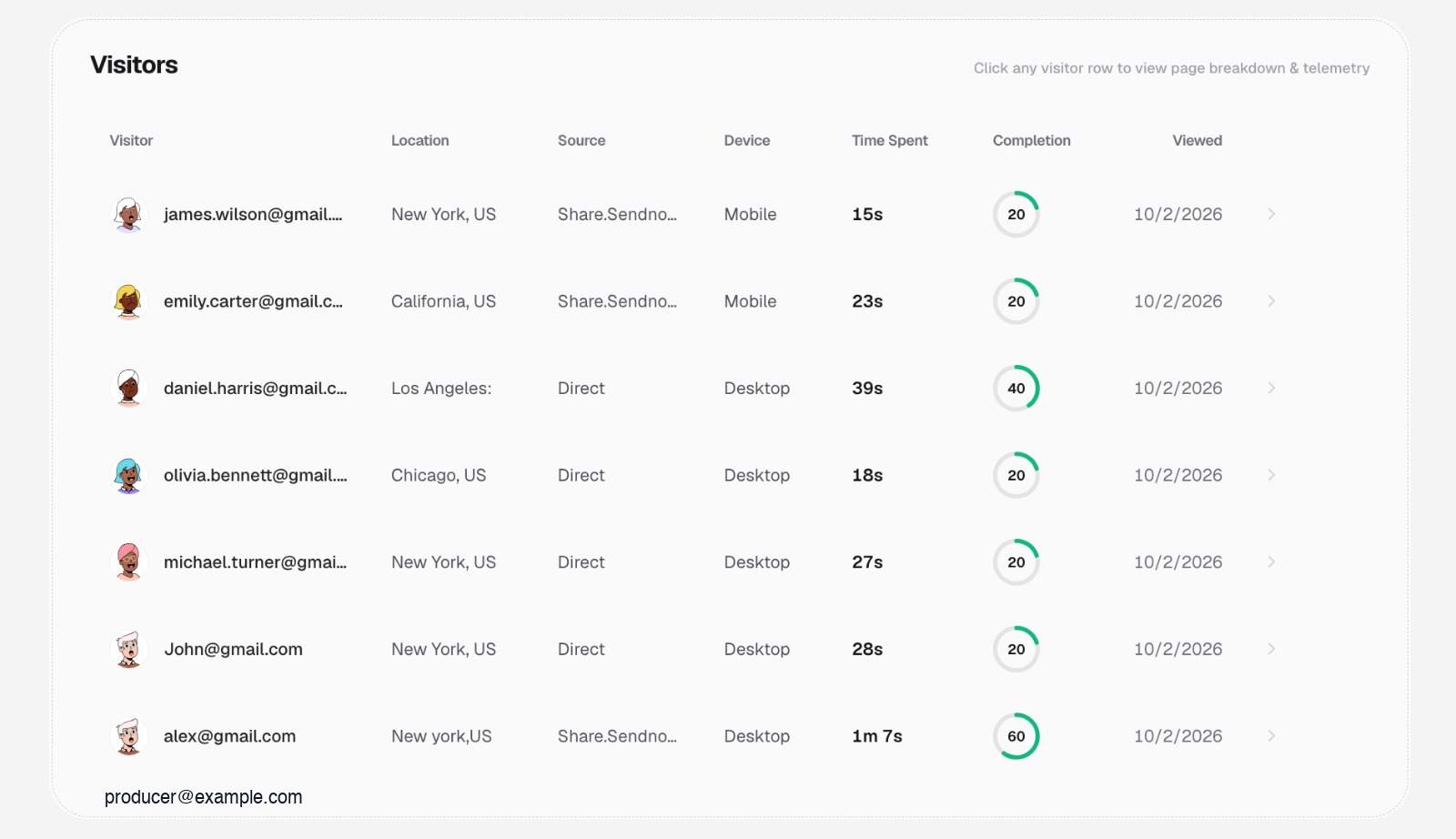 Figure 2: Multi-viewer audit table distinguishing casual openers from engaged decision-makers.
By reviewing individual records, production executives can tailor their communication:
- If a producer completed 85% of the script: Send a direct follow-up: “Saw you had a chance to explore our third-act sequence—would love to get your thoughts on the climax.”
- If a talent agent spent 15 seconds: Avoid aggressive follow-ups; the representative has not yet engaged with the material.
Detailed Session Timeline and Telemetry
Drilling into an individual reader’s session reveals a micro-level timeline:
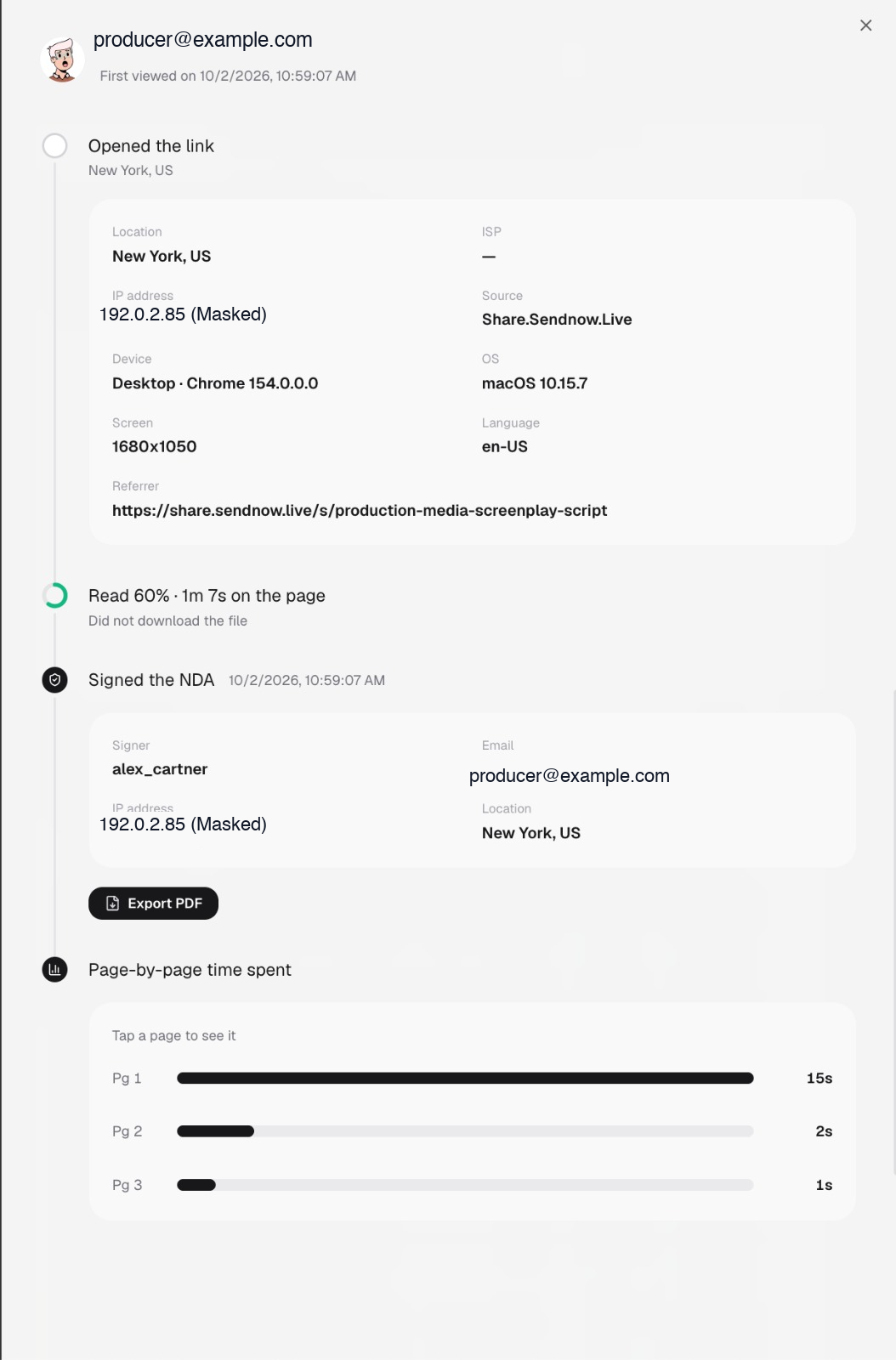 Figure 3: Granular reader telemetry timeline detailing exact page dwell times, agreement timestamp, and client parameters.
What Detailed Telemetry Captures
- Exact Opening Timestamp: When the reader initiated the session.
- Agreement Execution: Confirmation of when the in-line NDA was signed.
- Device & Screen Environment: Useful for verifying whether formatting issues (e.g., small screens) affected the reading experience.
- Precise Page Duration: Exact seconds allocated to individual pages (e.g., Page 1: 15s, Page 2: 2s, Page 3: 1s).
Analytical Responsibility: What Dwell Time Does Not Tell You
Document telemetry provides concrete behavioral data, but it requires mature interpretation:
- Dwell Time Is Not Comprehension: A long dwell time on Page 15 might mean the reader was captivated by a gripping dialogue exchange—or it might mean they set their laptop down to make coffee without closing the browser tab.
- Skimming Is Not Always Negative: Seasoned packaging executives often skim Act II to verify structural pacing before conducting a deeper read over the weekend.
- Never Weaponize Telemetry in Communication: Never contact a producer saying, “I noticed you stopped reading at page 14.” Use analytics to guide your internal timing and expectations, not to interrogate collaborators.
Related Reading
- Protecting Screenplay PDFs — Foundational document access controls.
- Controlled Script Sharing — Distributing distinct links across talent and executives.
- Screenplay Watermarking — Dynamic attribution across rendered pages.
- Screenplay Security Checklist — Pre-submission verification protocol.