Screenplay Watermarking: Dynamic Attribution and Leak Deterrence
Watermarking has been an established convention in Hollywood and international film production for decades. Traditionally, assistant directors or production coordinators stamped physical script copies with red ink or embedded static stamps like CONFIDENTIAL - PROPERTY OF STUDIO across cover pages.
In digital distribution, static watermarks offer minimal protection. If every recipient receives an identical document labeled CONFIDENTIAL, an illicit leak provides zero forensic clues regarding which individual compromised the script.
Modern script security relies on dynamic watermarking—an automated technique that embeds recipient-specific identification across every page rendered in real time.
Static Watermarks vs. Dynamic Watermarks
Understanding the functional distinction between static and dynamic approaches is vital when designing your document security architecture:
| Feature | Static Watermark | Dynamic Watermark |
|---|---|---|
| Content Rendered | Fixed phrase (e.g., CONFIDENTIAL, FOR YOUR EYES ONLY) |
Recipient email, timestamp, IP hash, viewing session ID |
| Forensic Attribution | None. Identifies the document as sensitive, but cannot trace the leaker. | High. Directly links captured pages to the exact viewing session. |
| Generation Overhead | Manually stamped once using desktop PDF tools. | Generated dynamically by the viewer engine on page render. |
| Psychological Deterrent | Minimal. Recipients know the file cannot be attributed back to them. | Substantial. Reviewers realize any shared screenshot displays their identity. |
Configuring Dynamic Watermarks for Screenplays
To achieve effective leak deterrence without frustrating key creative collaborators, the watermark must balance unambiguous visibility with script readability.
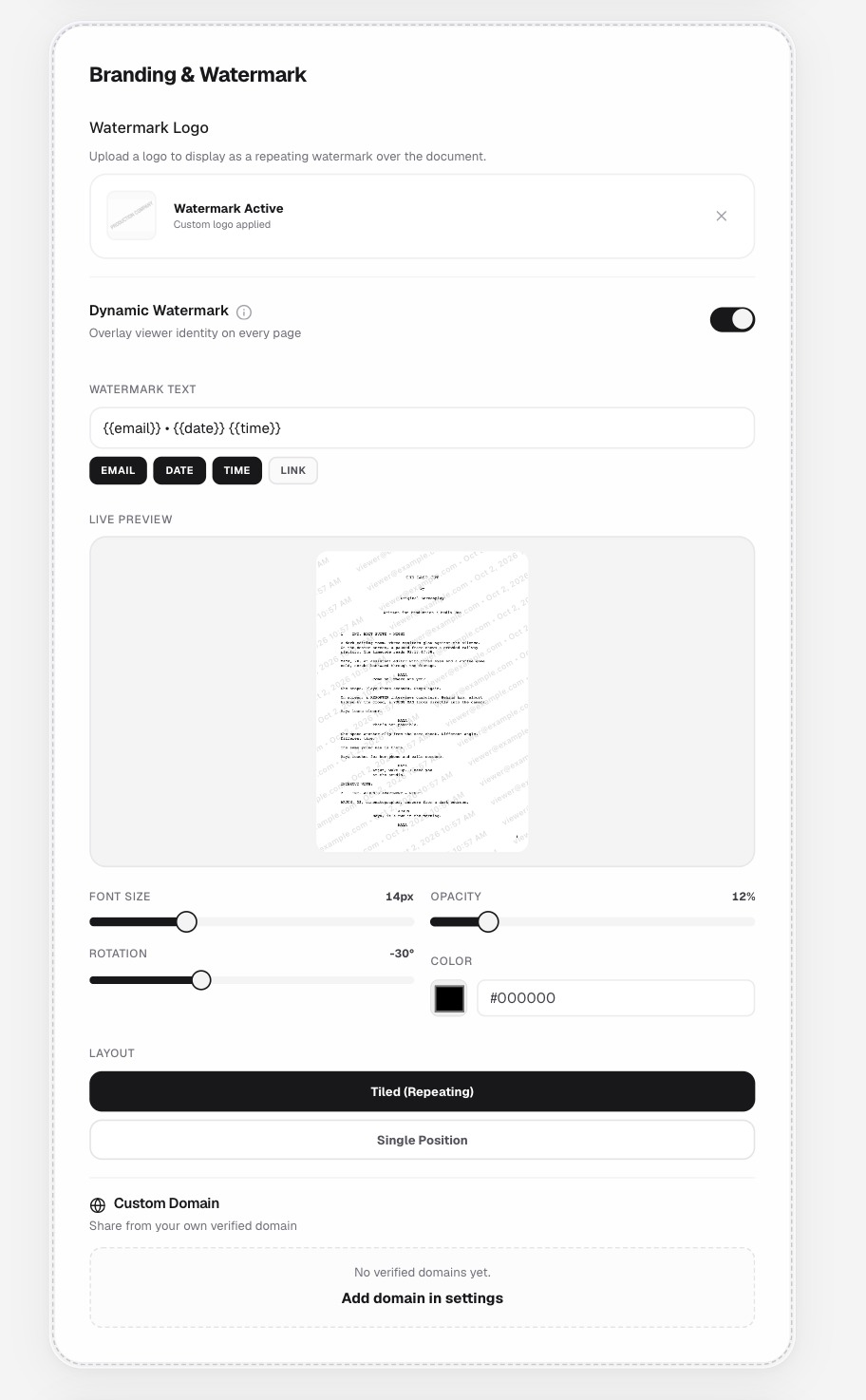 Figure 1: Setting up dynamic watermark variables, font scaling, opacity percentage, and repeating tiled layout.
1. Watermark Variable Syntax
Modern document sharing platforms support programmatic string interpolation. Recommended formatting includes:
•
- ``: Resolves to the authenticated email address of the reviewer (e.g.,
producer@example.com). - ``: Resolves to the current calendar date of access (e.g.,
Oct 2, 2026). - ``: Resolves to the exact time of the viewing session (e.g.,
10:57 AM).
If a viewer captures a photograph of a scene or attempts to excerpt plot details on social media, the visual stamp permanently displays their professional contact details and access timestamp.
2. Layout Geometry: Tiled (Repeating) vs. Single Position
- Single Center Stamp: A single large stamp across the center of the page leaves margins, dialogue blocks, and action descriptions clear. A bad actor can easily crop the edges of the page or excerpt specific dialogue beats without capturing the center stamp.
- Tiled (Repeating) Grid (Recommended): A repeating grid tiled at a diagonal angle (-30° or -45°) ensures that no section of dialogue, scene heading, or character slugline can be cropped out without including at least one complete watermark instance.
3. Opacity Calibration
Screenplays are text-dense documents formatted in Courier 12pt with narrow dialogue columns.
- Too Dark (> 20% Opacity): Obscures character names, parentheticals, and punctuation. Causes eye fatigue and prompts creative talent to abandon the read.
- Too Light (< 8% Opacity): High-contrast screenshot filters or simple phone camera adjustments can easily wash out the text.
- Recommended Range (10% to 14% Opacity): Subtly visible over whitespace, legible through text lines, and prominent enough to remain resilient against standard contrast manipulations.
Combining Studio Branding with Dynamic Attribution
A comprehensive document strategy frequently pairs a custom branding watermark with a dynamic viewer watermark:
- Custom Production Logo: Displays the production company or studio emblem across the page to establish formal copyright ownership and title branding.
- Dynamic Overlay: Sweeps across the logo and text blocks, embedding the reviewer’s personal identity.
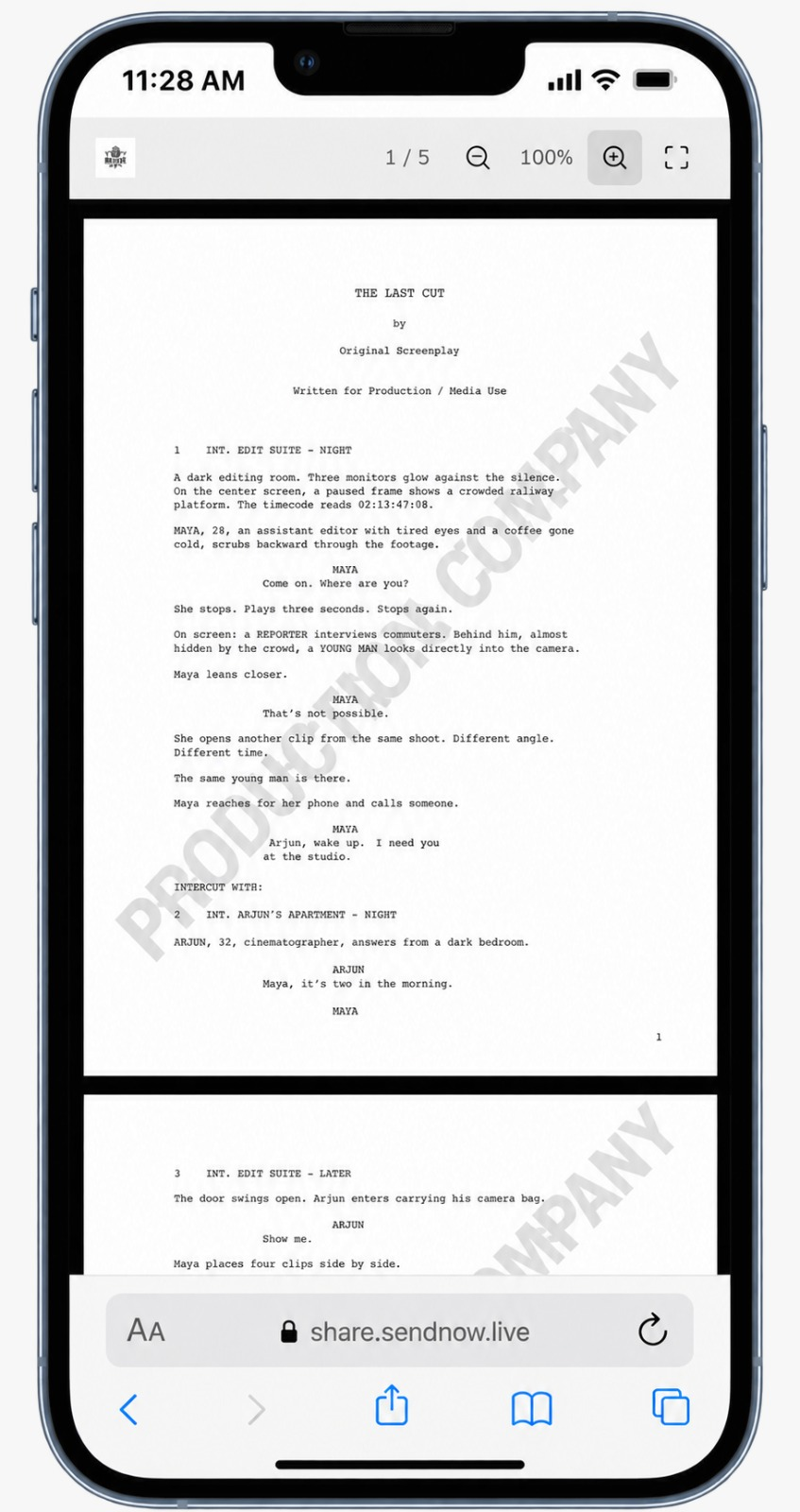 Figure 2: Fictional demonstration screenplay “THE LAST CUT” rendered inside a secure mobile viewer with continuous watermark protection across desktop and mobile devices.
Forensic Investigation: What to Do in the Event of a Leak
If an unauthorized excerpt appears online:
- Inspect Visible Artifacts: Check whether the leaked screenshot contains edge fragments, timestamp markers, or partial email strings.
- Cross-Reference Session Timestamps: Match the date and hour visible in the watermark against your document analytics audit log.
- Compare Device Telemetry: Use recorded viewport resolutions (e.g.,
1680x1050), browser engines (Chrome 154.0.0.0), and geographic locations from the session log to pinpoint the originating session.
Technical Limitations & Responsible Expectations
While dynamic watermarks are one of the single most effective psychological and forensic deterrents in digital publishing:
- They do not physically block cameras: An authorized individual can still aim a secondary mobile phone at the monitor. The watermark’s value lies in ensuring that any image taken by that camera carries the reviewer’s identity.
- They require clear contrast: Always test your opacity settings across both light and dark mode viewer configurations before sending high-stakes submissions.
Related Reading
- Protecting Screenplay PDFs — Technical foundations of secure browser viewing.
- Controlled Script Sharing — Persona-based sharing workflows and link management.
- Screenplay Reader Analytics — Tracking dwell time and page completion.
- Screenplay Security Checklist — The pre-flight verification checklist.